
Resources
Home Budget Analytics vs. Fintonic: which approach fits how you track your money
Fintonic and Home Budget Analytics solve the same problem - knowing where your money goes - from different starting points. Fintonic connects to your bank accounts and updates itself. Home Budget Analytics works from the statements you upload, categorizes them automatically, and lets you set savings goals on top. Neither is "better" in the abstract - here's what actually differs.
Two ways of getting your data
Fintonic is a Spanish app that aggregates your bank accounts in one place. It connects through an account-information service licensed by the Bank of Spain, shows your transactions with categories and charts, and flags things like bank fees and duplicate charges. Its strength is convenience: once connected, transactions arrive on their own.
Home Budget Analytics works the other way around. It doesn't connect to your bank: you upload a statement (CSV, OFX/QFX, CAMT.053 or QIF from any bank, plus PDF and Excel for supported banks), duplicates are removed, every transaction is categorized with rules you confirm once per merchant, and you see where the money actually went, month by month.

The dashboard right after a statement import - categorized and ready, no manual entry
Feature by feature
| Fintonic | Home Budget Analytics | |
|---|---|---|
| How it gets your data | Direct connection to your bank accounts, updated automatically | Statements you upload: CSV, OFX/QFX, CAMT.053 or QIF from any bank, plus PDF and Excel for supported banks |
| Access to your bank | Requires authorizing a connection with each bank, and only works with compatible banks | No bank connection: you decide which files to upload and when |
| Banks in other countries | Built for the Spanish market | Any bank that exports CSV, OFX, or similar; Santander is recognized automatically and statements from banks in other countries are supported |
| Categorization | Automatic categories and charts on connected transactions | Per-merchant rules you confirm once and that apply every time; duplicates removed automatically |
| Multiple currencies | Built around accounts at Spanish banks | Converts everything to your main currency, useful if you hold accounts in more than one country |
| Savings goals | Alerts and tips on spending, insurance, and bills | Goals with priority ordering, cascading savings into the next goal, and a projected completion date |
| Financial products | Also offers loans and other financial products through its platform | Spending analysis only: it doesn't sell or broker financial products |
| Price | Free app (check current terms on their site) | $6.99/month or $59.99/year, with a 14-day free trial and no card required |
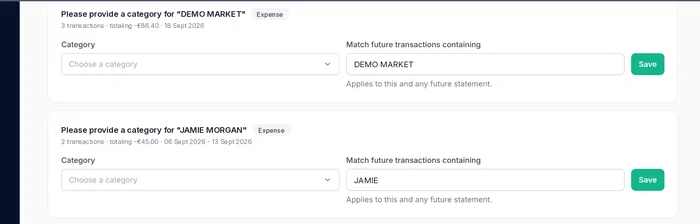
Confirm a category once for a new merchant - every future transaction from it is categorized the same way automatically
Where Fintonic clearly wins
If you never want to upload anything, Fintonic is more convenient: connect your accounts once and everything updates on its own, with alerts about fees and duplicate charges. For someone whose accounts are all at compatible Spanish banks and who's comfortable with a standing connection, it's hard to beat on convenience.
Home Budget Analytics fits a different profile: people who'd rather not connect their bank to any app, who hold accounts in several countries or at banks Fintonic doesn't cover, or who want a clear picture of the month - with savings goals included - without giving ongoing access to their accounts.
Common questions
Can I use both at the same time?
Yes, there's no conflict. Some people use Fintonic for day-to-day tracking and a statement-based tool like Home Budget Analytics for a monthly review, for accounts Fintonic doesn't cover, or to set savings goals.
Does Home Budget Analytics need access to my bank?
No. It doesn't connect to your bank or ask for your credentials - it only works with the statement files you upload.
Does it work with my Spanish bank?
Santander is recognized automatically (PDF and Excel). For any other bank that lets you download a statement as CSV, OFX/QFX, CAMT.053 or QIF, you can import it all the same - for CSV you match the columns once and save the mapping.
Is there a free trial?
Yes. You get a 14-day free trial with no card required, enough to upload your first statement and see the categorized result.
See your spending without connecting your bank
Upload a statement and get a categorized picture of where your money goes - free to try, no card required.
Start your free trial