
Install Home Budget Analytics as an app
Home Budget Analytics isn't in the App Store or Google Play, and it doesn't need to be - it installs directly from your browser onto your phone's or computer's home screen, where it opens full-screen with its own icon, exactly like a regular app, with nothing to download from a store first.
iPhone (Safari)
iOS doesn't have a one-tap install button - every browser on iPhone, including Safari, adds a site to your home screen through the same Share menu.
-
1
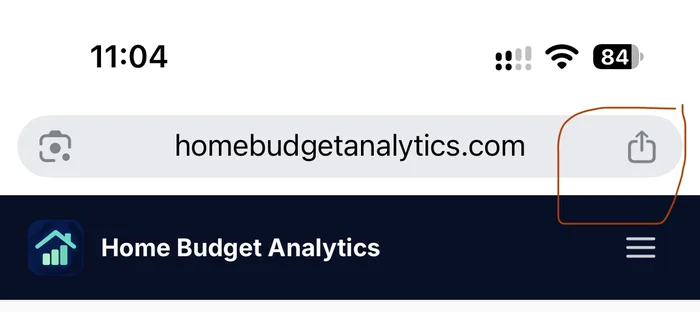
Open homebudgetanalytics.com and tap the Share icon
With the site open in Safari, tap the Share icon in the address bar (the square with an arrow pointing up).
-
2
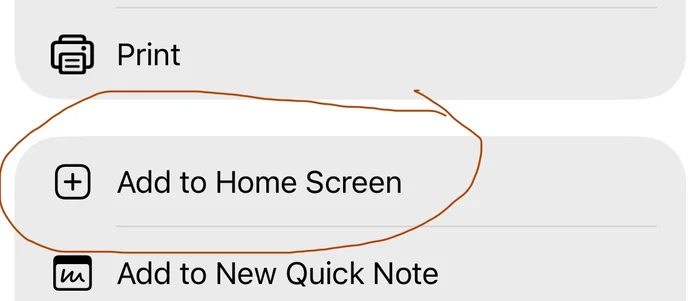
Tap "Add to Home Screen"
Scroll down the Share menu and tap "Add to Home Screen", then confirm with "Add" in the top-right corner. The icon now appears on your home screen like any other app.
Android (Chrome)
Android's Chrome often offers to install a site automatically after a visit or two - if it hasn't yet, you can trigger it yourself from the browser menu.
-
1
Open homebudgetanalytics.com and tap the menu (⋮)
With the site open in Chrome, tap the three-dot menu button in the top-right corner of the address bar.
-
2
Tap "Add to Home screen" or "Install app"
The exact wording depends on your Chrome version - look for "Add to Home screen" or "Install app" in the menu, tap it, then confirm. The app icon is added to your home screen.
Desktop (Chrome, Edge)
On desktop Chrome or Edge, open homebudgetanalytics.com and look for an install icon at the right edge of the address bar (a small screen with a downward arrow), or open the browser's main menu and look for "Install Home Budget Analytics…" or "Apps → Install this site as an app". Once installed, it opens in its own window from your taskbar, dock or Start menu, separate from your regular browser tabs.
Questions about installing
It's more than a bookmark - once installed, it opens full-screen with no browser address bar, gets its own icon and app-switcher entry, and behaves like any other installed app on your device. It's still the same web app under the hood, which is exactly why there's nothing to download from an app store first.
No - it's a shortcut to the same site you already use in your browser, not a separate download. It takes negligible extra space.
Not at all - everything works the same in an ordinary browser tab. Installing it is purely a convenience for getting back in faster.